
Sunday, December 27, 2009
iPhone secret tip of the day

Jailbreak iPhone 3.1.2 firmware
100% working Jailbreak iPhone 3.1.2 firmware
Using custom build firmaware didn't work for me. So I used blakra1n tool and I should say it's the best tool ever! It's fast and easy.Step 1: Download the latest version of iTunes if you haven’t already.(Download link)
Step 2: Update/restore to the original (stock) iPhone firmware 3.1.2 on your iPhone by using the latest version of iTunes.
Download iPhone OS 3.1.2 for iPhone 2G
Download iPhone OS 3.1.2 for iPhone 3G
Download iPhone OS 3.1.2 for iPhone 3GS
Step 3: You will now have to jailbreak your iPhone running on iPhone 3.1.2 firmware with blackra1n RC3. Follow the complete step by step guide posted before in order to jailbreak your iPhone 3G/3GS with blackra1n RC3.

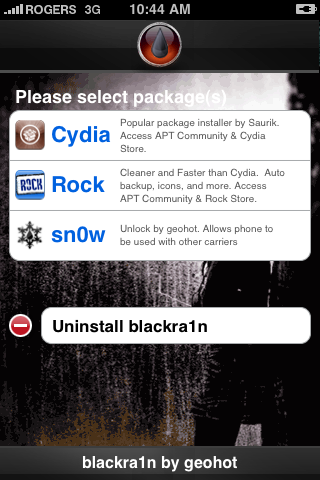
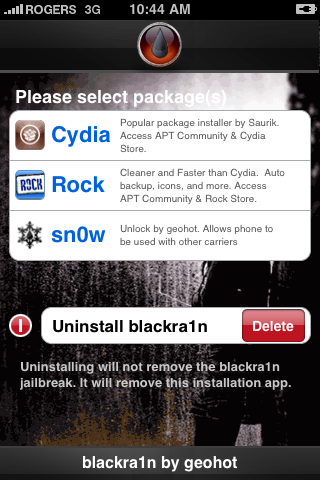
Step 4: Once you are done with the jailbreak choose the installer application of your choice then press to select Cydia. Press the Install button at the top right of the screen to begin.
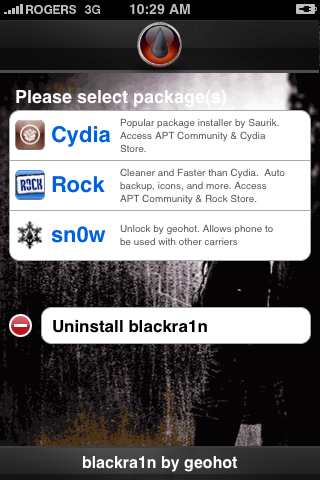
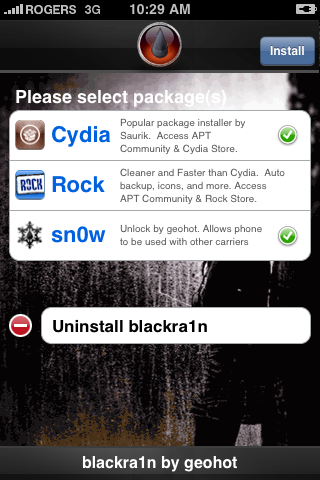
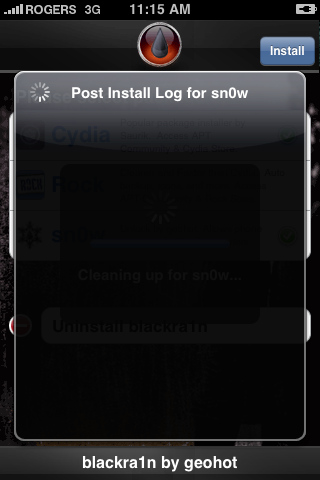
BlackRa1n will begin to download and install the package you selected.
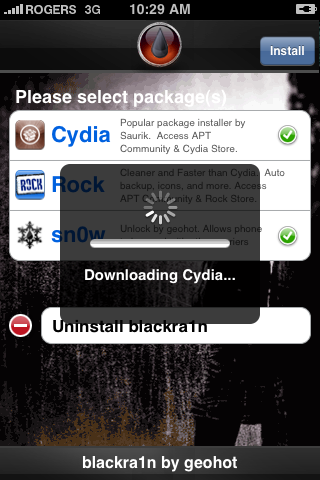
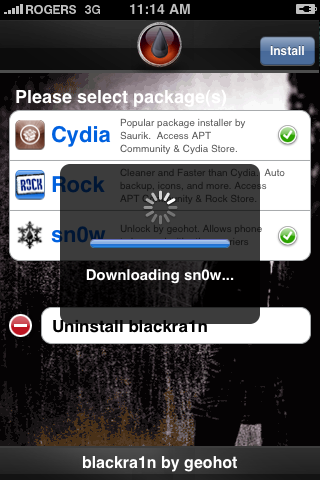
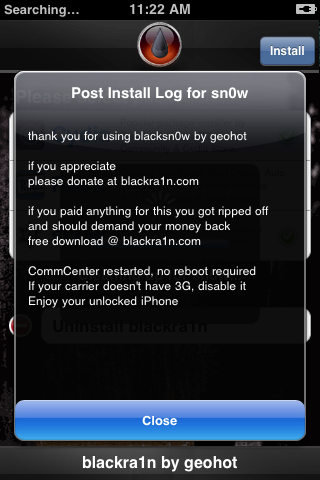
If you chose to unlock device using blacksn0w you will be presented with a Post Install log for sn0w. CommCenter will be restarted and there is no need to reboot. If your carrier doesn't support 3G then disable it. Press the Close button to continue.
Step 5
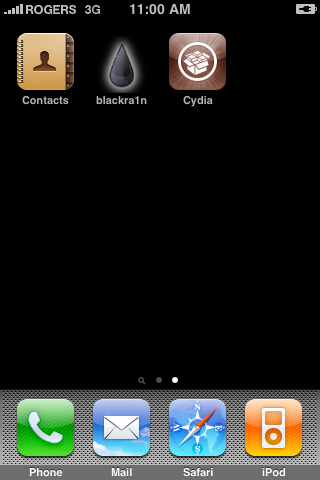
Once complete BlackRa1n will respring your iPhone and you will find the installer package of your choice on the Springboard.
Step 6
Once you have confirmed your installer package is working correctly you may use the Uninstall blackra1n button inside the BlackRa1n app to remove it from your springboard.
Friday, December 25, 2009
Download iPhone OS 3.1.2 Custom Firmware (IPSW Files) for iPhone 3GS, 3G, 2G
You can jailbreak iPhone OS 3.1.2 by creating Custom IPSW file using PwnageTool. For now, PwnageTool is available for Mac only. So, only Mac users are able to create custom firmwares. What if you’re on Windows? and do not own a Mac or don’t want to go through the PwnageTool procedure if so, this topic is for you.
Below you can download iPhone OS 3.1.2 Custom firmware for iPhone 3GS, iPhone 3G and iPhone 2G. These custom firmwares are created with PwnageTool and can be restored using iTunes.
IMPORTANT
There are two types of Custom Firmwares available for download below.
Activated (for UnOfficial Carrier Users)
Below you can download iPhone OS 3.1.2 Custom firmware for iPhone 3GS, iPhone 3G and iPhone 2G. These custom firmwares are created with PwnageTool and can be restored using iTunes.
IMPORTANT
There are two types of Custom Firmwares available for download below.
- ACTIVATED: This custom IPSW file is for users who want to unlock their iPhone which means they are NOT on Official Carrier only.
- NOT ACTIVATED: This custom IPSW file is for users who are on Official Carrier only.
How to Install Custom Firmware:
- Download the custom firmware (IPSW) (all parts) for your device from links below.
- Join the splitted custom IPSW file by unpacking them:
- Mac Users: use BetterZip ( or what ever you want )
- Windows Users: use HJSplit ( or what ever you want)
- Put iPhone in recovery mode. (How to put iPhone into Recovery Mode)
- Press the Shift button for Windows or ALT for Mac and click restore and used the custom ipsw.
- It will start restoring your iPhone which may take 10mins and will jailbreak iPhone. (iPhone 2G users are done here >Jailbreak+Unlock<. enjoy OS 3.1.2.)
- iPhone 3GS and 3G users who want to unlock iPhone needs to install UltraSn0w using following guide:
How to Unlock iPhone 3GS and 3G using UltraSn0w (This works for OS 3.1.2 as well)
Download iPhone OS 3.1.2 Custom Firmware (IPSW Files):
iPhone 3GS Custom IPSW
Activated (for UnOfficial Carrier Users)RAPIDSHARE:NOT Activated (for Official Carrier Users)
iPhone2_1_3.1.2_7D11_Custom_Restore_Activated.001
iPhone2_1_3.1.2_7D11_Custom_Restore_Activated.002
iPhone2_1_3.1.2_7D11_Custom_Restore_Activated.003
iPhone2_1_3.1.2_7D11_Custom_Restore_Activated.004
MEGAUPLOAD:
iPhone2_1_3.1.2_7D11_Custom_Restore_Activated.001
iPhone2_1_3.1.2_7D11_Custom_Restore_Activated.002
iPhone2_1_3.1.2_7D11_Custom_Restore_Activated.003
iPhone2_1_3.1.2_7D11_Custom_Restore_Activated.004
RAPIDSHARE:
iPhone2_1_3.1.2_7D11_Custom_Restore_NOT_Activated.001
iPhone2_1_3.1.2_7D11_Custom_Restore_NOT_Activated.002
iPhone2_1_3.1.2_7D11_Custom_Restore_NOT_Activated.003
iPhone2_1_3.1.2_7D11_Custom_Restore_NOT_Activated.004
MEGAUPLOAD:
iPhone2_1_3.1.2_7D11_Custom_Restore_NOT_Activated.001
iPhone2_1_3.1.2_7D11_Custom_Restore_NOT_Activated.002
iPhone2_1_3.1.2_7D11_Custom_Restore_NOT_Activated.003
iPhone2_1_3.1.2_7D11_Custom_Restore_NOT_Activated.004
iPhone 3G Custom IPSW
Activated (for UnOfficial Carrier Users)RAPIDSHARE:NOT Activated (for Official Carrier Users)
iPhone1_2_3.1.2_7D11_Custom_Restore-Activated.001
iPhone1_2_3.1.2_7D11_Custom_Restore-Activated.002
iPhone1_2_3.1.2_7D11_Custom_Restore-Activated.003
MEGAUPLOAD:
iPhone1_2_3.1.2_7D11_Custom_Restore-Activated.001
iPhone1_2_3.1.2_7D11_Custom_Restore-Activated.002
iPhone1_2_3.1.2_7D11_Custom_Restore-Activated.003
iPhone1_2_3.1.2_7D11_Custom_Restore_NOT_Activated.001
iPhone1_2_3.1.2_7D11_Custom_Restore_NOT_Activated.002
iPhone1_2_3.1.2_7D11_Custom_Restore_NOT_Activated.003
iPhone 2G Custom IPSW
Activated (for UnOfficial Carrier Users)RAPIDSHARE:
iPhone1_1_3.1.2_7D11_Custom_Restore_Activated.001
iPhone1_1_3.1.2_7D11_Custom_Restore_Activated.002
iPhone1_1_3.1.2_7D11_Custom_Restore_Activated.003
MEGAUPLOAD:
iPhone1_1_3.1.2_7D11_Custom_Restore_Activated.001
iPhone1_1_3.1.2_7D11_Custom_Restore_Activated.002
iPhone1_1_3.1.2_7D11_Custom_Restore_Activated.003
Monday, December 21, 2009
PC Suite for iPhone v2.7.0.112
http://www.tunethatup.com/utilitaes
Best option for backups and more
DownloadVersion :2.7.0.112
Requirements :1.0.1,1.0.2,1.1.1,1.1.2,1.1.3,1.1.4,2.0,2.0.1,2.0.2,2.1,2.2,2.2.1,3.0,3.0.1,3.1,3.1.2
Size : 32719 kb
License: Free
Downloads:154126
Description
PC Suite fully supports mobile phones on the iPhone, Android and Windows Mobile platforms. As long as you have PC Suite, massive resources are free to access.
Free! - PC Suite is totally free to use. Additionally, it offers free technical support, free resources downloading and installation
Manage your smart phone easily and safely! - Back up and import contacts, back up and import call logs and SMS records, set the ringtones, themes and wallpapers, manage the system, memory and registry of the phone, install and uninstall software, manage schedule…you can manage all functions and settings on your smart phone.
Chat via SMS! - You can chat with your friends and family via the SMS online on your PC easily.
Massive resources, free to install! - Wallpapers, ringtones, themes, softwares, games and eBooks, FREE is our eternal principle.
Gorgeous use experience! - We integrate the iPhone style in PC Suite to make you enjoy the most fashionable interface and feel the most considerate operation during your use.
PC Suite for iPhone update to V2.7.0.112 (Dec. 14, 2009)
Best option for backups and more
DownloadVersion :2.7.0.112
Requirements :1.0.1,1.0.2,1.1.1,1.1.2,1.1.3,1.1.4,2.0,2.0.1,2.0.2,2.1,2.2,2.2.1,3.0,3.0.1,3.1,3.1.2
Size : 32719 kb
License: Free
Downloads:154126
Description
PC Suite fully supports mobile phones on the iPhone, Android and Windows Mobile platforms. As long as you have PC Suite, massive resources are free to access.
Free! - PC Suite is totally free to use. Additionally, it offers free technical support, free resources downloading and installation
Manage your smart phone easily and safely! - Back up and import contacts, back up and import call logs and SMS records, set the ringtones, themes and wallpapers, manage the system, memory and registry of the phone, install and uninstall software, manage schedule…you can manage all functions and settings on your smart phone.
Chat via SMS! - You can chat with your friends and family via the SMS online on your PC easily.
Massive resources, free to install! - Wallpapers, ringtones, themes, softwares, games and eBooks, FREE is our eternal principle.
Gorgeous use experience! - We integrate the iPhone style in PC Suite to make you enjoy the most fashionable interface and feel the most considerate operation during your use.
PC Suite for iPhone update to V2.7.0.112 (Dec. 14, 2009)
Sunday, December 13, 2009


As we had posted some days back about Blacksn0w first ever tool to unlock iPhone OS 3.1.2 with baseband 05.11.07 is ready now and all set to release. Geohot has confirmed that its successfully working on iPhone OS 3.1.2.
Blacksn0w will be available via Blackra1n RC3, in order to unlock iPhone 3G/3Gs 3.1.2 you need to first upgrade to firmware 3.1.2 and then download Blackra1n for windows/mac and click on make it ra1n. once your iPhone reboots you will see “blackra1n” app click on it You will see “sn0w”. Install this, and enjoy your unlocked iPhone.
Features of Blackra1n RC3
1. Hacktivation support,
2. 15 second speed improvement,
3. Tiger+PPC support,
4. and installation of the latest blackra1n.app
Download Blackra1n RC3 to Jailbreak & Unlock iPhone 3.1.2.
Here is what’s important to note:
* BlackSn0w unlocks baseband 05.11.07
* BlackSn0w enables internet tethering
* BlackSn0w is for iPhone 3G and 3GS users only
Those of you with iPhone 2G should follow the guide posted here for unlocking and jailbreaking 3.1.2 firmware. Here is a complete step by step guide on how to unlock iPhone 3G and 3GS running 3.1.2 firmware on 05.11.07 baseband with blacksn0w.
NOTE: Those of you who have already installed blackra1n RC1 or RC2 should just run the the app and touch on “ra1n”, which has been added now instead of “Icy”. This will upgrade blackra1n to RC3. Now simply follow the instruction written in Step 5 below to unlock your iPhone.
with 3.1.2 firmware on 05.11.07 baseband.
How to unlock iPhone 3.1.2 with blackSn0w?
* As mentioned above, if you previously jailbroke your iPhone using BlackRa1n and you kept the blackra1n.app on it, then run BlackRa1n. The Icy icon should be replaced by the “ra1n” option. Select “ra1n” to upgrade BlackRa1n to RC3. After upgrading, run BlackRa1n and you should see the “sn0w” option. Just select “sn0w” and it will unlock your iPhone.
* If you were waiting to update to 3.1.2 or if your iPhone was stuck locked, then download BlackSn0w, run it, reboot, and choose the “sn0w” option from the BlackRa1n.app.
* If your iPhone was previously jailbroken using PwnageTool or if you deleted the BlackRa1n.app from your iPhone, BlackSn0w will be added to Cydia later during the day.
Step 1: Download the latest version of iTunes if you haven’t already.(Download link)
Step 2: Update/restore to the original (stock) iPhone firmware 3.1.2 on your iPhone by using the latest version of iTunes.
Download iPhone OS 3.1.2 for iPhone 2G
Download iPhone OS 3.1.2 for iPhone 3G
Download iPhone OS 3.1.2 for iPhone 3GS
Step 3: You will now have to jailbreak your iPhone running on iPhone 3.1.2 firmware with blackra1n RC3. Follow the complete step by step guide posted before in order to jailbreak your iPhone 3G/3GS with blackra1n RC3.
Step 4: Once you are done with the jailbreak, start the blackra1n app and you should now see “sn0w” option as can be seen from the screenshot below:

Step 5: Now simply touch on “sn0w” to install blacksn0w on your iPhone. This will automatically unlock your iPhone 3G/3GS running 3.1.2 firmware on 05.11.07 baseband.
blacksn0w will soon be available on Cydia too. If you have upgraded to 3.1.2 firmware with PwnageTool 3.1.4, then you will soon be able to unlock your iPhone with 05.11.07 baseband with ease. Stay tuned for more updates on this!
Subscribe to:
Comments (Atom)

 Posts
Posts

